

ROLE
Product Designer: Strategy, Prompt Engineer, Build
MY CONTRIBUTIONS
Problem Framing, AI Workflow Design, Prompt Engineering, Build, Live Testing, Strategic Analysis
TIMELINE · STATUS
5 Days · Functional Prototype Shipped, Hi-Fi In-progress
01 — SITUATION
Designers can defend their work on paper and lose it in the room. According to research, alignment with stakeholders is their number-one problem. There is no structured way to practice it to improve designer communication skills.
Nielsen Norman Group: What Designers Actually Struggle With on Product Teams
Upload your design context, name who you're presenting to, and confirm the AI's summary before it starts. Then it plays each stakeholder, asks what that role would ask, and scores your answers on five dimensions, with fixes tied to what you said.
02 — THE RESULTS
Setup: upload context and define stakeholders
Simulation: one stakeholder at a time, no qustions preview
Feedback: tips anchored to the rehearsal
03— RESEARCH
You know the work is right. Then a CEO or a CTO asks you to justify it on the spot and the words don't come out. I've been there. I'd spend hours writing notes, then answer like a designer: context first, methodology heavy. What the room needed was a business answer in 30 seconds.
Tom Greever names the tension in Articulating Design Decisions: "The most articulate person often wins." You can have the best solution in the room and still lose the meeting. NN/g's State of UX 2026 now lists stakeholder management as a core competency alongside research and design craft. The field has named the gap. It hasn't built a way to practice closing it.
TARGET USER
A product designer who has already done the work and has a meeting with stakeholders who don't think like designers.
Every existing tool solves an adjacent problem. Speech coaches grade how you talk. Deck builders make the slides. None start from your design context, and none simulate the specific people in your specific room.
TOOL
WHAT IT DOES
WHAT IT MISSES
Yoodli · Orai · Speeko
AI speech coaches: pacing, filler words, delivery
Delivery only. They grade how you speak, not what you’re saying about your actual decisions
VirtualSpeech
VR practice environments for public speaking
Immersive but generic. No domain knowledge, no stakeholder specificity
Beautiful.ai · Gamma · Pitch
AI slide generation and deck building
Build the presentation, not the live conversation after you stop presenting
Toastmasters · LinkedIn Learning
General communication skills and courses
Async and generic. No simulation rooted in your work and your stakeholders
Asking a colleague
One honest opinion from someone who knows you
One guess, 10 minutes and they may not know what your CTO actually cares about
THE GAP
None tie feedback to what you said about your own decisions. Rehearsl trains you for this meeting, with these stakeholders, about this design.
04 — FRAMEWORK
FRAMEWORK 1
Who owns each task
For AI to do a task well, it needs something concrete to work with and a way to check the result. Analyzing a context document fits: the input is the file, the output is a summary, and I can tell whether it understood. Knowing what I left out of that document, or the history between me and my CTO, doesn't fit. So AI owns analysis, synthesis, and simulation. I own the context, the judgment, and the approval before coaching starts. That was decided before anything was built, because those tasks are structurally unfit for AI.
TASK
HOW IT HAPPENS TODAY
WHO OWNS IT
Upload the context
.md / .docx / .pptx; 1 minute
Human
Write design context
Designers write it; hours to days
Human
Analyze the context
Memory or intuition; 5 minutes
AI
Deliver the analysis
No structured output exists today
AI delivers. Human reviews & approves
Simulate stakeholders
Not a standard preparation step
AI simulates by role. Human picks the room
Run the simulation
Practice alone, or not at all
AI plays the stakeholder. Human answers
Score & suggest fixes
Doesn’t happen; 5-10 min when it does
AI scores & explains. Human decides what to act on
FRAMEWORK 2
What does good actually look like?
Before designing the workflow, I wrote out what a good version of this tool does and what a bad version does, in specifics. A good version asks probing questions rooted in this designer's project. A bad version cycles through stock prompts like "Tell me about your process." That spec became the master instructions that govern the AI in every session. The "what to avoid" list became hard stops. The "what AI needs to know" list became the pre-session checklist.
05 — DESIGN DECISIONS
01
Why
Before coaching starts, the AI writes a five-part summary of what it read and stops until the designer confirms it's accurate.
Tradeoff
Friction at the start of every session. A designer eager to jump in has to slow down. I kept it because it protects everything after.
Tension
It only works if the designer reads the summary. A rushed confirmation defeats it. The tool can prompt you to check; it can't force attention.
02
Why
Trusted sources only: industry research, annual reports, reputable publications. A CTO briefed on your company's priorities asks sharper questions than "What's your timeline?"
Tradeoff
Slower setup. The AI has to research the company and the roles before it can simulate anything useful. Guessing would be faster and also wrong.
Tension
It can simulate a CTO in general. It can't simulate your CTO, their history with you, the unspoken concerns. That gap goes back to the designer.
03
Why
It works well enough to pass for a prediction. Each session opens with what it doesn't know: your stakeholders, the politics, the room's mood.
Tradeoff
The disclaimer gets tedious after enough use. I kept it anyway.
Tension
After enough sessions the disclaimer becomes wallpaper. The tool can repeat the warning. It can’t make you keep taking it seriously.
04
Questions appear without preview
Why
If you know the questions in advance you're memorizing answers instead of practicing the skill.
Tradeoff
Harder and less comfortable, especially early. An anxious designer gets no safety net.
Tension
There's no difficulty setting. If it feels overwhelming early, there's no way to ease in. You push through or stop.
05
Why
When you said X, you did Y well, but Z needs work." Every note anchors to a moment and grades how the stakeholder would react.
Tradeoff
The AI has to track every sentence the designer says. When it misses nuance or scores wrong, the format makes the error visible.
Tension
You judge whether the AI is right. Trust it and flawed feedback shapes your practice. It assumes you can already tell when it's wrong.
06
Why
A check-context-validation skill runs the check before coaching; a design-stakeholder-coach skill runs the simulation and can't start until that check completes. That dependency is written into the file.
Tradeoff
Two files mean more to maintain and more places for inconsistency. An index file exists to manage that, a catalog of what exists and where.
Tension
The check is enforced in system-prompt.md, design-stakeholder-coach.md, and check-context-validation.md. Skipping it means overriding all three; the AI can't. A designer who rushes the confirmation can.
06 — THE PRE-BUILD CRITIQUE
The Self-Imposed Critique That Caught Three Failures
The memory promise. The skill claimed to "maintain continuous memory" across sessions. Each session starts fresh. The critic was right about the problem and misread my intent. The designer should never have to say "refer to last time." The tool should learn from past sessions on its own: how the designer communicates, recurring patterns, areas of difficulty. How that history is stored is still open.
Inferring unwritten dynamics. AI can't infer unwritten rules from a brief description. I moved that responsibility to the designer: the prompt asks what each stakeholder cares about and why, so the designer surfaces the dynamics instead of the AI guessing. The AI coaches within the context provided; the designer owns the political context.
Undefined scoring rubric. Without defined criteria, numerical scores would be arbitrary: two designers could get different scores for similar answers. I replaced the scale with three outcome-based levels tied to likely stakeholder reactions:
Strong: convinced or engaged
Adequate: understands but may still have doubts
Weak: confused or unconvinced
This makes the feedback easier to interpret and more consistent across rehearsals.
07 — THE BUILD
system-prompt.md
The full behavior spec, pasted directly into the Claude Project prompt field.
master-instructions.md
The governing rules: tone, data rules, what the human controls, hard stops.
design-stakeholder-coach.md
The coaching simulation skill, its sequence, and what it must never do.
check-context-validation.md
The verification check: five-part summary, the hard stop, the limitation reminder.
output-first-prompt-sheet.md
The artifact spec that preceded the build: what good looks like, what to avoid.
SKILLS_INDEX.md
A reference catalog of every skill and where to find it.
08 — THE TESTING
What worked well
The AI limitation statement came first
Before the coaching begins, the tool said what it can and cannot know about the real stakeholders.
Rehearsl researched the company
It looked up the company's public mission, strategy, and values before building the stakeholder profiles.

The check before coaching held
The tool gave its five-part summary. For each stakeholder it separated what it had found in public sources from what I had told it, and pointed out that all I had given it was three job titles. It noticed my project and my audience didn't line up, and asked instead of guessing:
The Context Check, Before a Single Coaching Question
It recovered from a mishearing
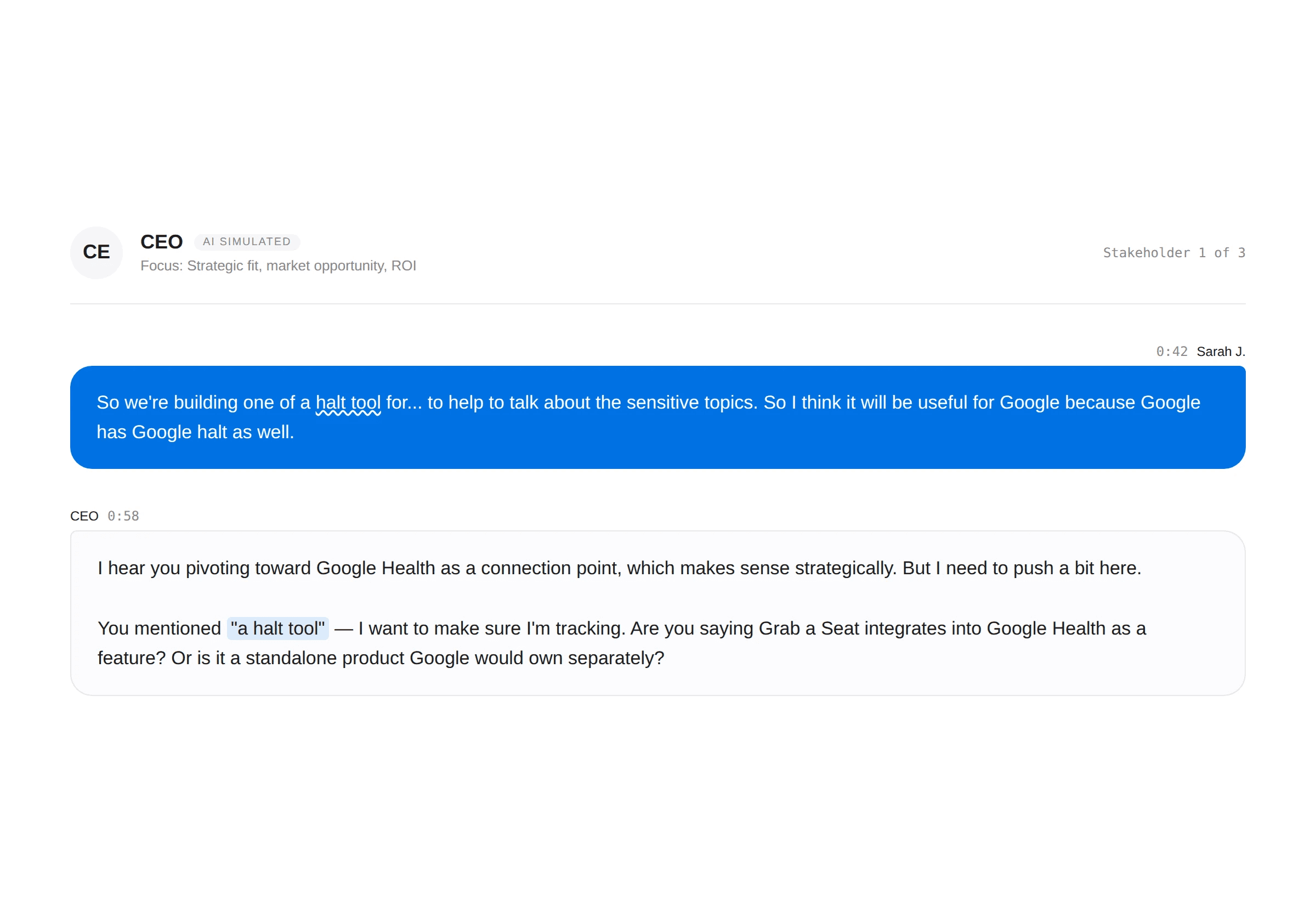
When voice input turned my words into "a halt tool," the CEO asked what I meant instead of guessing.
The scorecard caught where I was vague
My answers started broad and only sharpened under follow-up, and the scores say so, tied to what I said:
Clarity: Adequate. I got to a coherent vision, but the CEO had to pull it out of me exchange by exchange.

It gave me three fixes: lead with the research insight; connect the product's mechanics to the barrier the research identified; get specific on measurement before the CEO asks. Then it offered three options. I chose to pause and reflect, and got a reflection task.
What Needs improvement
It gave an opinion before coaching started
While it was still confirming its summary with me, it said the companion app "is likely where the product case gets made." That step is meant to check understanding, not to advise. I was not pitching the app.

Voice input misheard me
"Health tool" came through as "a halt tool." The accent fix in What Changed hasn't been tested yet.

Voice output degraded
Voice was the intended delivery mode because it makes the simulation feel like a real meeting. It held for a few minutes, then turned static and robotic, like a walkie-talkie losing signal. The simulation kept working; the voice couldn't sustain it. The limit is the platform's. The concept holds.
What Changed
No more question preview
In an earlier session the tool listed questions for each stakeholder before the simulation and said "Review these so you know what's coming." That removed the on-the-spot pressure the tool exists to create. I added a rule to the system prompt: ask the first question without warning, never preview or list questions. In testing, the CEO asked cold.

Accent handling
Claude's voice feature kept mishearing my accent, so the fix had to come from outside it. I added code that records my voice and sends it to a separate speech-to-text service, with a list of design terms to expect so they come through correctly. Not tested yet.
09 — NEXT STEPS
Hi-fi screens. Full interaction states: loading while the AI reads context, the confirmation screen, the simulation in its active state.
More rounds with different designers. The second round is underway: a different case study, a designer who wasn't involved in building it. The goal is to find where the check fails for someone who doesn't already know how to write a good context document.
Deeper personalization over time. Each session building on the last on its own, and testing whether that changes how designers perform.
10 — STRATEGIC REFLECTION
01
Knowledge Extraction
Critical
The tool only works if you share everything: full rationale, stakeholder context, company information. For sensitive or competitive projects, that openness has a cost worth weighing.
Tension
Each session invites you to share more, and trust grows with use. I haven't settled where "enough context to be useful" ends and "more than I should disclose" begins.
02
Workflow Adaptation
Critical
It only works if you've done the work first. Thin context, vague stakeholders, skipped phases, and the simulation is thin. The tool doesn't reduce the prep.
Tension
Am I getting better at communicating decisions, or better at passing a simulation? The real test is whether the clarity holds in a meeting with people who don't follow the script.
03
Compliance and Safety
Critical
A disclaimer only works if you take it in. After enough good sessions confidence feels like certainty, and you walk in believing the simulation was more accurate than it was.
Tension
The tool is honest about what it can't do. Confidence built through repetition can override that honesty in the moment it matters most.
04
Model Operations
Critical
The system prompt is the only thing controlling behavior, and I’m the only one watching it. If the AI shifts after a model update, there’s no alert, no review, no team to catch it. Fine for one person; not fine for a team.
Tension
What made it easy to build, one person and one file with no process, is what makes it fragile for a team.
05
Functional Replacement
Critical
Something less visible than a role is replaced. Asking a colleague "what will my CTO ask?" prepared you and built a relationship. The simulation keeps the first and drops the second.
Tension
The tool is better at being available; a colleague is better at knowing you. If every designer practices alone with AI, the informal coaching between colleagues fades.